<?xml version="1.0" encoding="utf-8"?>
<?xml-stylesheet href="https://humbird0.com/atom.xsl" type="text/xsl"?>
<feed xmlns="http://www.w3.org/2005/Atom">

	<title>How I Learned To Make Websites Updates</title>
	<updated>2021-10-29T00:00:00Z</updated>
	<id>humbird0.com/content/blog/how_i_learned_to_make_websites/updates.xml</id>

	<subtitle>All updates to How I Learned To Make Websites</subtitle>
	<link rel="self" href="https://humbird0.com/content/blog/how_i_learned_to_make_websites/updates.xml" />
	<link rel="alternate" href="https://humbird0.com/content/show.htm" />
	<icon>https://humbird0.com/apple-touch-icon.png</icon>
	<logo>https://humbird0.com/css/feed_logo.png</logo>
	<author>
		<name>humbird0</name>
	</author>


	<entry>
		<title>How I Learned To Make Websites</title>
		<id>tag:humbird0.com,2024-10-29T22:20:36Z:how-i-learned-to-make-websites</id>
		<updated>2024-10-29T22:20:36Z</updated>

		<link rel="alternate" href="https://humbird0.com/content/blog/how_i_learned_to_make_websites/content.htm" />
		<category term="how-i-learned-to-make-websites" />
		<summary type="html">
			&lt;div&gt;
				&lt;p&gt;
					These days it&apos;s kind of hard for people to figure out what matters next to the mountain of advertisements for JavaScript frameworks and &quot;helper&quot; tools.&lt;br /&gt;*Spoiler alert:*  ALL of them are optional. Most of them make things *more complicated.* And they do that on purpose so they can sell you their &quot;solution&quot;. Most of them should be avoided. The truth is that HTML itself is actually simple. Just focus on [HTML and CSS](https://webguide.neocities.org/css/). Then experiment with other things later.&lt;br /&gt;&lt;br /&gt;https://webguide.neocities.org/css/

 &lt;a href=&quot;https://webguide.neocities.org/css/&quot;&gt;https://webguide.neocities.org/css/&lt;/a&gt;
				&lt;/p&gt;
				&lt;a href=&quot;https://humbird0.com/content/blog/how_i_learned_to_make_websites/content/neocities.png&quot;&gt;
					&lt;img src=&quot;https://humbird0.com/content/blog/how_i_learned_to_make_websites/content/neocities.png&quot; loading=&quot;lazy&quot; alt=&quot;neocities&quot; /&gt;
				&lt;/a&gt;
			&lt;/div&gt;
		</summary>
		<content type="xhtml">
			<div>
				<p>
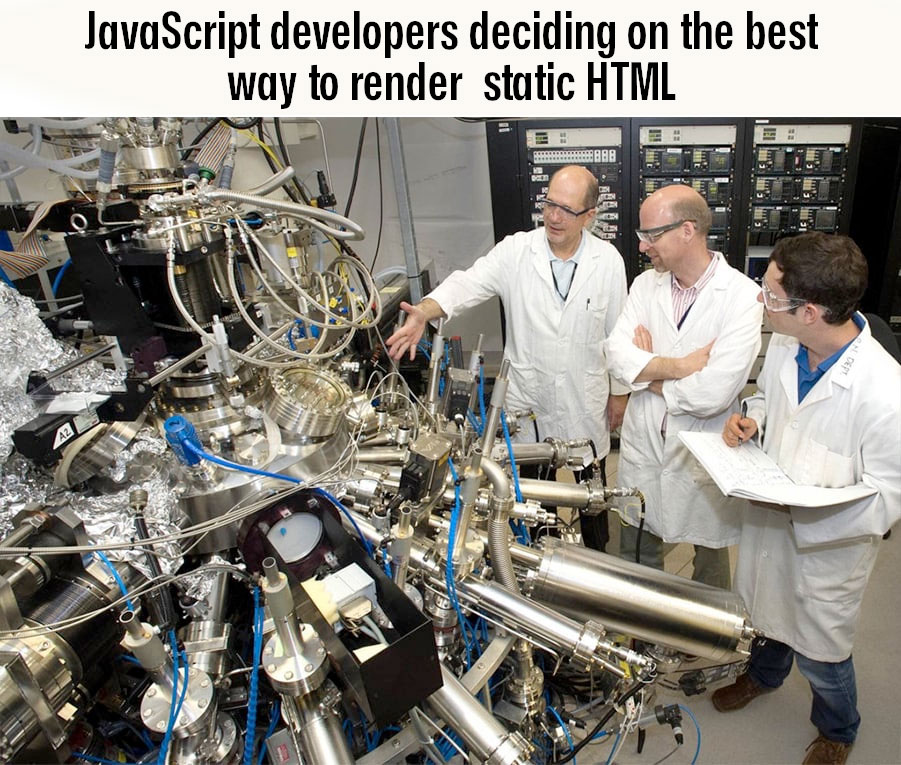
					These days it's kind of hard for people to figure out what matters next to the mountain of advertisements for JavaScript frameworks and "helper" tools.<br />*Spoiler alert:*  ALL of them are optional. Most of them make things *more complicated.* And they do that on purpose so they can sell you their "solution". Most of them should be avoided. The truth is that HTML itself is actually simple. Just focus on [HTML and CSS](https://webguide.neocities.org/css/). Then experiment with other things later.<br /><br />https://webguide.neocities.org/css/
 <a href="https://webguide.neocities.org/css/">https://webguide.neocities.org/css/</a>
				</p>
				<a href="https://humbird0.com/content/blog/how_i_learned_to_make_websites/content/neocities.png">
					<img src="https://humbird0.com/content/blog/how_i_learned_to_make_websites/content/neocities.png" loading="lazy" alt="neocities" />
				</a>
			</div>
		</content>
	</entry>


	<entry>
		<title>How I Learned To Make Websites</title>
		<id>tag:humbird0.com,2024-10-29T22:19:41Z:how-i-learned-to-make-websites</id>
		<updated>2024-10-29T22:19:41Z</updated>

		<link rel="alternate" href="https://humbird0.com/content/blog/how_i_learned_to_make_websites/content.htm" />
		<category term="how-i-learned-to-make-websites" />
		<summary type="html">
			&lt;div&gt;
				&lt;p&gt;
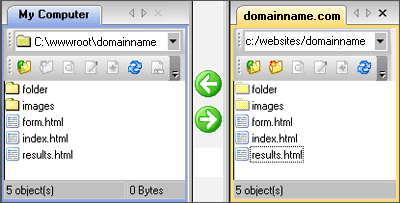
					## Your Turn&lt;br /&gt;&lt;br /&gt;So when I tell people that making websites is easy, that&apos;s because I remember using simple visual editors, making simple websites with tables, signing up for [cheap hosting](https://www.dreamhost.com/) (Which only costs about $3 a month), and [using FTP](https://www.hostmysite.com/support/upload/ftp/) to drag-and-drop files onto the internet. I watched HTML grow from something simple to something with a bunch of optional complexity, so I already know which parts are optional. But I forget that other people *don&apos;t*.
				&lt;/p&gt;
				&lt;a href=&quot;https://humbird0.com/content/blog/how_i_learned_to_make_websites/content/ftp.png&quot;&gt;
					&lt;img src=&quot;https://humbird0.com/content/blog/how_i_learned_to_make_websites/content/ftp.png&quot; loading=&quot;lazy&quot; alt=&quot;ftp&quot; /&gt;
				&lt;/a&gt;
			&lt;/div&gt;
		</summary>
		<content type="xhtml">
			<div>
				<p>
					## Your Turn<br /><br />So when I tell people that making websites is easy, that's because I remember using simple visual editors, making simple websites with tables, signing up for [cheap hosting](https://www.dreamhost.com/) (Which only costs about $3 a month), and [using FTP](https://www.hostmysite.com/support/upload/ftp/) to drag-and-drop files onto the internet. I watched HTML grow from something simple to something with a bunch of optional complexity, so I already know which parts are optional. But I forget that other people *don't*.
				</p>
				<a href="https://humbird0.com/content/blog/how_i_learned_to_make_websites/content/ftp.png">
					<img src="https://humbird0.com/content/blog/how_i_learned_to_make_websites/content/ftp.png" loading="lazy" alt="ftp" />
				</a>
			</div>
		</content>
	</entry>


	<entry>
		<title>How I Learned To Make Websites</title>
		<id>tag:humbird0.com,2024-10-29T22:19:04Z:how-i-learned-to-make-websites</id>
		<updated>2024-10-29T22:19:04Z</updated>

		<link rel="alternate" href="https://humbird0.com/content/blog/how_i_learned_to_make_websites/content.htm" />
		<category term="how-i-learned-to-make-websites" />
		<summary type="html">
			&lt;div&gt;
				&lt;p&gt;
					So I&apos;m back to using templates. But this time I&apos;m not relying on Dreamweaver and Adobe. I&apos;m using a program called [HUGO](https://gohugo.io/about/introduction/), which is free, open-source, and multi-platform. I can just write my pages as simple Markdown text files, and HUGO converts them into web pages for me. But since I already know all about HTML and CSS I wrote my own templates for HUGO to make my pages exactly the way I want them. But you could just use a pre-existing [HUGO theme](https://themes.gohugo.io/) instead.
				&lt;/p&gt;
				&lt;a href=&quot;https://humbird0.com/content/blog/how_i_learned_to_make_websites/content/unlimited-power.jpg&quot;&gt;
					&lt;img src=&quot;https://humbird0.com/content/blog/how_i_learned_to_make_websites/content/unlimited-power.jpg&quot; loading=&quot;lazy&quot; alt=&quot;unlimited power&quot; /&gt;
				&lt;/a&gt;
			&lt;/div&gt;
		</summary>
		<content type="xhtml">
			<div>
				<p>
					So I'm back to using templates. But this time I'm not relying on Dreamweaver and Adobe. I'm using a program called [HUGO](https://gohugo.io/about/introduction/), which is free, open-source, and multi-platform. I can just write my pages as simple Markdown text files, and HUGO converts them into web pages for me. But since I already know all about HTML and CSS I wrote my own templates for HUGO to make my pages exactly the way I want them. But you could just use a pre-existing [HUGO theme](https://themes.gohugo.io/) instead.
				</p>
				<a href="https://humbird0.com/content/blog/how_i_learned_to_make_websites/content/unlimited-power.jpg">
					<img src="https://humbird0.com/content/blog/how_i_learned_to_make_websites/content/unlimited-power.jpg" loading="lazy" alt="unlimited power" />
				</a>
			</div>
		</content>
	</entry>


	<entry>
		<title>How I Learned To Make Websites</title>
		<id>tag:humbird0.com,2024-10-29T22:17:33Z:how-i-learned-to-make-websites</id>
		<updated>2024-10-29T22:17:33Z</updated>

		<link rel="alternate" href="https://humbird0.com/content/blog/how_i_learned_to_make_websites/content.htm" />
		<category term="how-i-learned-to-make-websites" />
		<summary type="html">
			&lt;div&gt;
				&lt;p&gt;
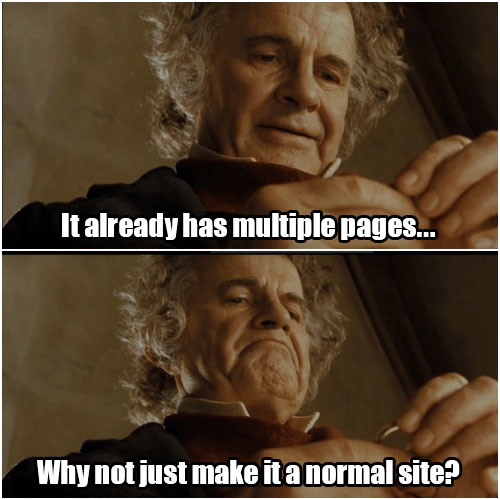
					Eventually I realized that my JavaScript website had long since given up the efficiency of a single JSON file in exchange for preservability. It also took over 2 seconds to load even over a blazing fast internet connection. Meanwhile a normal &quot;static&quot; website could do all of these things better.  And since each of my projects already had its own HTML page for their &quot;readme&quot; descriptions, it was almost a static website already, so why did I need the JavaScript? I also wanted to write my website using Markdown to make its content more [future-proof.](http://humbird0.com/content/blog/storing_website_content/content.htm) So in 2023 I completely remade my website using a static site generator called [HUGO](https://gohugo.io/about/introduction/).
				&lt;/p&gt;
				&lt;a href=&quot;https://humbird0.com/content/blog/how_i_learned_to_make_websites/content/why-not-make-it-a-static-website.jpg&quot;&gt;
					&lt;img src=&quot;https://humbird0.com/content/blog/how_i_learned_to_make_websites/content/why-not-make-it-a-static-website.jpg&quot; loading=&quot;lazy&quot; alt=&quot;why not make it a static website&quot; /&gt;
				&lt;/a&gt;
			&lt;/div&gt;
		</summary>
		<content type="xhtml">
			<div>
				<p>
					Eventually I realized that my JavaScript website had long since given up the efficiency of a single JSON file in exchange for preservability. It also took over 2 seconds to load even over a blazing fast internet connection. Meanwhile a normal "static" website could do all of these things better.  And since each of my projects already had its own HTML page for their "readme" descriptions, it was almost a static website already, so why did I need the JavaScript? I also wanted to write my website using Markdown to make its content more [future-proof.](http://humbird0.com/content/blog/storing_website_content/content.htm) So in 2023 I completely remade my website using a static site generator called [HUGO](https://gohugo.io/about/introduction/).
				</p>
				<a href="https://humbird0.com/content/blog/how_i_learned_to_make_websites/content/why-not-make-it-a-static-website.jpg">
					<img src="https://humbird0.com/content/blog/how_i_learned_to_make_websites/content/why-not-make-it-a-static-website.jpg" loading="lazy" alt="why not make it a static website" />
				</a>
			</div>
		</content>
	</entry>


	<entry>
		<title>How I Learned To Make Websites</title>
		<id>tag:humbird0.com,2024-10-29T22:16:08Z:how-i-learned-to-make-websites</id>
		<updated>2024-10-29T22:16:08Z</updated>

		<link rel="alternate" href="https://humbird0.com/content/blog/how_i_learned_to_make_websites/content.htm" />
		<category term="how-i-learned-to-make-websites" />
		<summary type="html">
			&lt;div class=&quot;has_loli has_nude has_nsfw&quot;&gt;
				&lt;p&gt;
					Meanwhile my old JavaScript website could display an entire fully usable thumbnail gallery if JavaScript is off. After learning about [The Wayback Machine](https://web.archive.org/), I became obsessed with [semantic HTML](https://www.semrush.com/blog/semantic-html5-guide/#html-semantic-tags-for-structure), machine-readable [metadata](https://schema.org/docs/gs.html), and [digital preservation](https://youtu.be/-2ZTmuX3cog?t=898), so I modified my JavaScript website to work perfectly even on the WayBack Machine. Go ahead and [try it](https://web.archive.org/web/20220913010449/http://humbird0.com/content/show.htm). Even the old search engine still works!&lt;br /&gt;&lt;br /&gt;https://web.archive.org/web/20100919152731/http://humbird0.net63.net/base/show.htm
 &lt;a href=&quot;https://web.archive.org/web/20100919152731/http://humbird0.net63.net/base/show.htm&quot;&gt;https://web.archive.org/web/20100919152731/http://humbird0.net63.net/base/show.htm&lt;/a&gt;
				&lt;/p&gt;
				&lt;a href=&quot;https://humbird0.com/content/blog/how_i_learned_to_make_websites/content/website-2022.jpg&quot;&gt;
					&lt;img src=&quot;https://humbird0.com/content/blog/how_i_learned_to_make_websites/content/website-2022.jpg&quot; loading=&quot;lazy&quot; alt=&quot;website 2022&quot; /&gt;
				&lt;/a&gt;
			&lt;/div&gt;
		</summary>
		<content type="xhtml">
			<div class="has_loli has_nude has_nsfw">
				<p>
					Meanwhile my old JavaScript website could display an entire fully usable thumbnail gallery if JavaScript is off. After learning about [The Wayback Machine](https://web.archive.org/), I became obsessed with [semantic HTML](https://www.semrush.com/blog/semantic-html5-guide/#html-semantic-tags-for-structure), machine-readable [metadata](https://schema.org/docs/gs.html), and [digital preservation](https://youtu.be/-2ZTmuX3cog?t=898), so I modified my JavaScript website to work perfectly even on the WayBack Machine. Go ahead and [try it](https://web.archive.org/web/20220913010449/http://humbird0.com/content/show.htm). Even the old search engine still works!<br /><br />https://web.archive.org/web/20100919152731/http://humbird0.net63.net/base/show.htm
 <a href="https://web.archive.org/web/20100919152731/http://humbird0.net63.net/base/show.htm">https://web.archive.org/web/20100919152731/http://humbird0.net63.net/base/show.htm</a>
				</p>
				<a href="https://humbird0.com/content/blog/how_i_learned_to_make_websites/content/website-2022.jpg">
					<img src="https://humbird0.com/content/blog/how_i_learned_to_make_websites/content/website-2022.jpg" loading="lazy" alt="website 2022" />
				</a>
			</div>
		</content>
	</entry>


	<entry>
		<title>How I Learned To Make Websites</title>
		<id>tag:humbird0.com,2024-10-29T22:15:19Z:how-i-learned-to-make-websites</id>
		<updated>2024-10-29T22:15:19Z</updated>

		<link rel="alternate" href="https://humbird0.com/content/blog/how_i_learned_to_make_websites/content.htm" />
		<category term="how-i-learned-to-make-websites" />
		<summary type="html">
			&lt;div&gt;
				&lt;p&gt;
					## Avoiding Modern Mistakes&lt;br /&gt;&lt;br /&gt;As a side-effect I mostly ignored the React.js craze, CoffeeScript, SASS, and the avalanche of other JavaScript helper libraries and build tools that were released over the years. I simply didn&apos;t need them. That turned out to be a very good thing. Most &quot;professional&quot; websites struggle to even display a simple picture if JavaScript is turned off.
				&lt;/p&gt;
				&lt;a href=&quot;https://humbird0.com/content/blog/how_i_learned_to_make_websites/content/javascript-complexity.jpg&quot;&gt;
					&lt;img src=&quot;https://humbird0.com/content/blog/how_i_learned_to_make_websites/content/javascript-complexity.jpg&quot; loading=&quot;lazy&quot; alt=&quot;javascript complexity&quot; /&gt;
				&lt;/a&gt;
			&lt;/div&gt;
		</summary>
		<content type="xhtml">
			<div>
				<p>
					## Avoiding Modern Mistakes<br /><br />As a side-effect I mostly ignored the React.js craze, CoffeeScript, SASS, and the avalanche of other JavaScript helper libraries and build tools that were released over the years. I simply didn't need them. That turned out to be a very good thing. Most "professional" websites struggle to even display a simple picture if JavaScript is turned off.
				</p>
				<a href="https://humbird0.com/content/blog/how_i_learned_to_make_websites/content/javascript-complexity.jpg">
					<img src="https://humbird0.com/content/blog/how_i_learned_to_make_websites/content/javascript-complexity.jpg" loading="lazy" alt="javascript complexity" />
				</a>
			</div>
		</content>
	</entry>


	<entry>
		<title>How I Learned To Make Websites</title>
		<id>tag:humbird0.com,2024-10-29T22:14:37Z:how-i-learned-to-make-websites</id>
		<updated>2024-10-29T22:14:37Z</updated>

		<link rel="alternate" href="https://humbird0.com/content/blog/how_i_learned_to_make_websites/content.htm" />
		<category term="how-i-learned-to-make-websites" />
		<summary type="html">
			&lt;div&gt;
				&lt;p&gt;
					I didn&apos;t download a bunch of &quot;helper&quot; JavaScript libraries.  I mostly just used [jQuery](https://jquery.com/) to tame Internet Explorer&apos;s quirks and [require.js](https://requirejs.org/) to organize stuff, and then wrote the rest myself. It all worked so well that I never felt any need to add &quot;helper&quot; code.
				&lt;/p&gt;
				&lt;video muted=&quot;muted&quot; controls=&quot;controls&quot; loop=&quot;loop&quot; src=&quot;https://humbird0.com/content/blog/how_i_learned_to_make_websites/content/i-dont-need-helper-code.mp4&quot; loading=&quot;lazy&quot; /&gt;
			&lt;/div&gt;
		</summary>
		<content type="xhtml">
			<div>
				<p>
					I didn't download a bunch of "helper" JavaScript libraries.  I mostly just used [jQuery](https://jquery.com/) to tame Internet Explorer's quirks and [require.js](https://requirejs.org/) to organize stuff, and then wrote the rest myself. It all worked so well that I never felt any need to add "helper" code.
				</p>
				<video muted="muted" controls="controls" loop="loop" src="https://humbird0.com/content/blog/how_i_learned_to_make_websites/content/i-dont-need-helper-code.mp4" loading="lazy" />
			</div>
		</content>
	</entry>


	<entry>
		<title>How I Learned To Make Websites</title>
		<id>tag:humbird0.com,2024-10-29T22:13:56Z:how-i-learned-to-make-websites</id>
		<updated>2024-10-29T22:13:56Z</updated>

		<link rel="alternate" href="https://humbird0.com/content/blog/how_i_learned_to_make_websites/content.htm" />
		<category term="how-i-learned-to-make-websites" />
		<summary type="html">
			&lt;div&gt;
				&lt;p&gt;
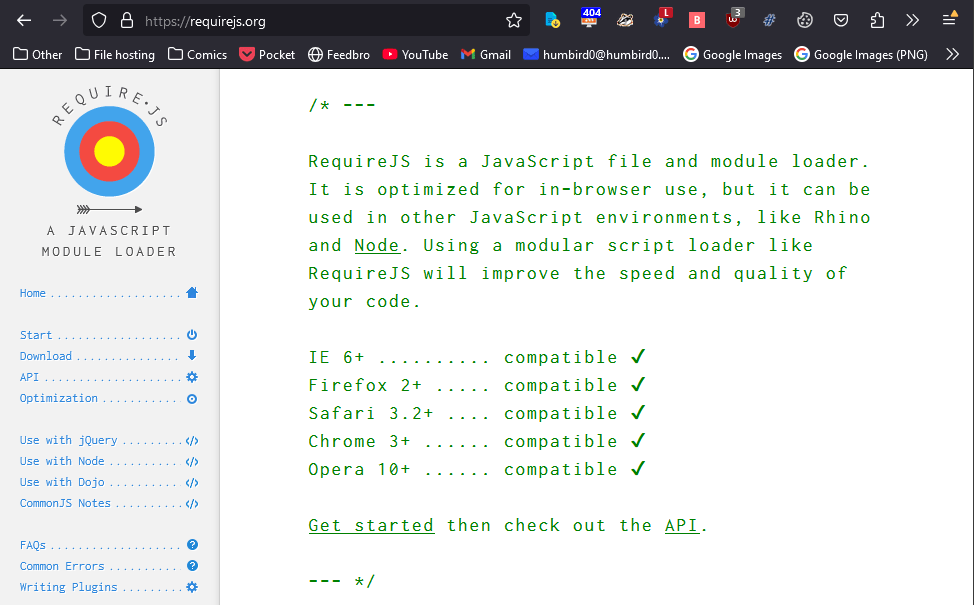
					I briefly tried using [React.js](https://briefs.video/videos/what-is-react/) but it seemed like extreme overkill, so instead I wrote my own &quot;model-view controller&quot; from scratch. Originally as a single long JS file. Then I discovered [require.js](https://requirejs.org/).  This thing is glorious!  Modular programming baby!  The concept itself even revolutionized the way I program my Flash games.&lt;br /&gt;&lt;br /&gt;https://requirejs.org/
 &lt;a href=&quot;https://requirejs.org/&quot;&gt;https://requirejs.org/&lt;/a&gt;
				&lt;/p&gt;
				&lt;a href=&quot;https://humbird0.com/content/blog/how_i_learned_to_make_websites/content/require-js.png&quot;&gt;
					&lt;img src=&quot;https://humbird0.com/content/blog/how_i_learned_to_make_websites/content/require-js.png&quot; loading=&quot;lazy&quot; alt=&quot;require js&quot; /&gt;
				&lt;/a&gt;
			&lt;/div&gt;
		</summary>
		<content type="xhtml">
			<div>
				<p>
					I briefly tried using [React.js](https://briefs.video/videos/what-is-react/) but it seemed like extreme overkill, so instead I wrote my own "model-view controller" from scratch. Originally as a single long JS file. Then I discovered [require.js](https://requirejs.org/).  This thing is glorious!  Modular programming baby!  The concept itself even revolutionized the way I program my Flash games.<br /><br />https://requirejs.org/
 <a href="https://requirejs.org/">https://requirejs.org/</a>
				</p>
				<a href="https://humbird0.com/content/blog/how_i_learned_to_make_websites/content/require-js.png">
					<img src="https://humbird0.com/content/blog/how_i_learned_to_make_websites/content/require-js.png" loading="lazy" alt="require js" />
				</a>
			</div>
		</content>
	</entry>


	<entry>
		<title>How I Learned To Make Websites</title>
		<id>tag:humbird0.com,2024-10-29T22:12:21Z:how-i-learned-to-make-websites</id>
		<updated>2024-10-29T22:12:21Z</updated>

		<link rel="alternate" href="https://humbird0.com/content/blog/how_i_learned_to_make_websites/content.htm" />
		<category term="how-i-learned-to-make-websites" />
		<summary type="html">
			&lt;div&gt;
				&lt;p&gt;
					And I had already learned [JavaScript](https://developer.mozilla.org/en-US/docs/Learn/JavaScript)... completely by accident!  It turned out that Flash&apos;s [ActionScript](https://en.wikipedia.org/wiki/ActionScript) language was basically just JavaScript in a trench coat. I had already created my custom [RPG Maker](http://humbird0.com/content/misc/rpgMaker/content.htm) by this point, so I was pretty damn good at it.
				&lt;/p&gt;
				&lt;a href=&quot;https://humbird0.com/content/blog/how_i_learned_to_make_websites/content/javascript-flash.jpg&quot;&gt;
					&lt;img src=&quot;https://humbird0.com/content/blog/how_i_learned_to_make_websites/content/javascript-flash.jpg&quot; loading=&quot;lazy&quot; alt=&quot;javascript flash&quot; /&gt;
				&lt;/a&gt;
			&lt;/div&gt;
		</summary>
		<content type="xhtml">
			<div>
				<p>
					And I had already learned [JavaScript](https://developer.mozilla.org/en-US/docs/Learn/JavaScript)... completely by accident!  It turned out that Flash's [ActionScript](https://en.wikipedia.org/wiki/ActionScript) language was basically just JavaScript in a trench coat. I had already created my custom [RPG Maker](http://humbird0.com/content/misc/rpgMaker/content.htm) by this point, so I was pretty damn good at it.
				</p>
				<a href="https://humbird0.com/content/blog/how_i_learned_to_make_websites/content/javascript-flash.jpg">
					<img src="https://humbird0.com/content/blog/how_i_learned_to_make_websites/content/javascript-flash.jpg" loading="lazy" alt="javascript flash" />
				</a>
			</div>
		</content>
	</entry>


	<entry>
		<title>How I Learned To Make Websites</title>
		<id>tag:humbird0.com,2024-10-29T22:10:47Z:how-i-learned-to-make-websites</id>
		<updated>2024-10-29T22:10:47Z</updated>

		<link rel="alternate" href="https://humbird0.com/content/blog/how_i_learned_to_make_websites/content.htm" />
		<category term="how-i-learned-to-make-websites" />
		<summary type="html">
			&lt;div&gt;
				&lt;p&gt;
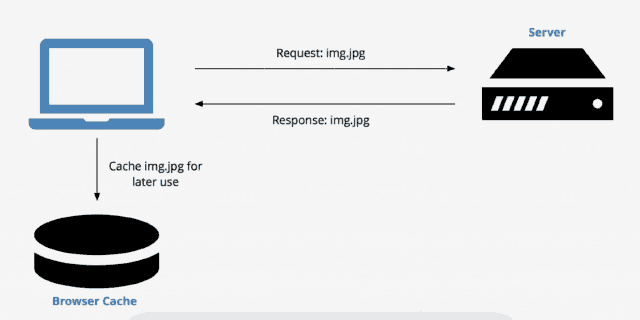
					But that has drawbacks too. My [Pokemon hentai game](http://humbird0.com/content/games/pokemon/content.htm) was in full-swing and all the downloads were stressing my free domain, so I switched to a paid host for $10 bucks a month and looked for ways to make a more efficient website. I heard about this new thing called &quot;Single-page JavaScript websites&quot; so I thought I&apos;d try it. It seemed to make sense. In theory if everything is rendered and [cached](https://en.wikipedia.org/wiki/Web_cache) on the visitor&apos;s computer, and I later add a new project then the only new thing people have to download is a single JSON file and a tiny thumbnail picture.
				&lt;/p&gt;
				&lt;a href=&quot;https://humbird0.com/content/blog/how_i_learned_to_make_websites/content/browser-cache.png&quot;&gt;
					&lt;img src=&quot;https://humbird0.com/content/blog/how_i_learned_to_make_websites/content/browser-cache.png&quot; loading=&quot;lazy&quot; alt=&quot;browser cache&quot; /&gt;
				&lt;/a&gt;
			&lt;/div&gt;
		</summary>
		<content type="xhtml">
			<div>
				<p>
					But that has drawbacks too. My [Pokemon hentai game](http://humbird0.com/content/games/pokemon/content.htm) was in full-swing and all the downloads were stressing my free domain, so I switched to a paid host for $10 bucks a month and looked for ways to make a more efficient website. I heard about this new thing called "Single-page JavaScript websites" so I thought I'd try it. It seemed to make sense. In theory if everything is rendered and [cached](https://en.wikipedia.org/wiki/Web_cache) on the visitor's computer, and I later add a new project then the only new thing people have to download is a single JSON file and a tiny thumbnail picture.
				</p>
				<a href="https://humbird0.com/content/blog/how_i_learned_to_make_websites/content/browser-cache.png">
					<img src="https://humbird0.com/content/blog/how_i_learned_to_make_websites/content/browser-cache.png" loading="lazy" alt="browser cache" />
				</a>
			</div>
		</content>
	</entry>


	<entry>
		<title>How I Learned To Make Websites</title>
		<id>tag:humbird0.com,2024-10-29T22:09:26Z:how-i-learned-to-make-websites</id>
		<updated>2024-10-29T22:09:26Z</updated>

		<link rel="alternate" href="https://humbird0.com/content/blog/how_i_learned_to_make_websites/content.htm" />
		<category term="how-i-learned-to-make-websites" />
		<summary type="html">
			&lt;div&gt;
				&lt;p&gt;
					I also learned that storing downloads on external sites like Dropbox and 4shared was inherently unreliable. They all tend to go down eventually, or delete things when you&apos;re not looking. Everything on your website should just be ON your website, so it only goes away when you tell it to.
				&lt;/p&gt;
				&lt;a href=&quot;https://humbird0.com/content/blog/how_i_learned_to_make_websites/content/imgur-is-down-again.png&quot;&gt;
					&lt;img src=&quot;https://humbird0.com/content/blog/how_i_learned_to_make_websites/content/imgur-is-down-again.png&quot; loading=&quot;lazy&quot; alt=&quot;imgur is down again&quot; /&gt;
				&lt;/a&gt;
			&lt;/div&gt;
		</summary>
		<content type="xhtml">
			<div>
				<p>
					I also learned that storing downloads on external sites like Dropbox and 4shared was inherently unreliable. They all tend to go down eventually, or delete things when you're not looking. Everything on your website should just be ON your website, so it only goes away when you tell it to.
				</p>
				<a href="https://humbird0.com/content/blog/how_i_learned_to_make_websites/content/imgur-is-down-again.png">
					<img src="https://humbird0.com/content/blog/how_i_learned_to_make_websites/content/imgur-is-down-again.png" loading="lazy" alt="imgur is down again" />
				</a>
			</div>
		</content>
	</entry>


	<entry>
		<title>How I Learned To Make Websites</title>
		<id>tag:humbird0.com,2024-10-29T22:08:08Z:how-i-learned-to-make-websites</id>
		<updated>2024-10-29T22:08:08Z</updated>

		<link rel="alternate" href="https://humbird0.com/content/blog/how_i_learned_to_make_websites/content.htm" />
		<category term="how-i-learned-to-make-websites" />
		<summary type="html">
			&lt;div class=&quot;has_loli has_nude has_nsfw&quot;&gt;
				&lt;p&gt;
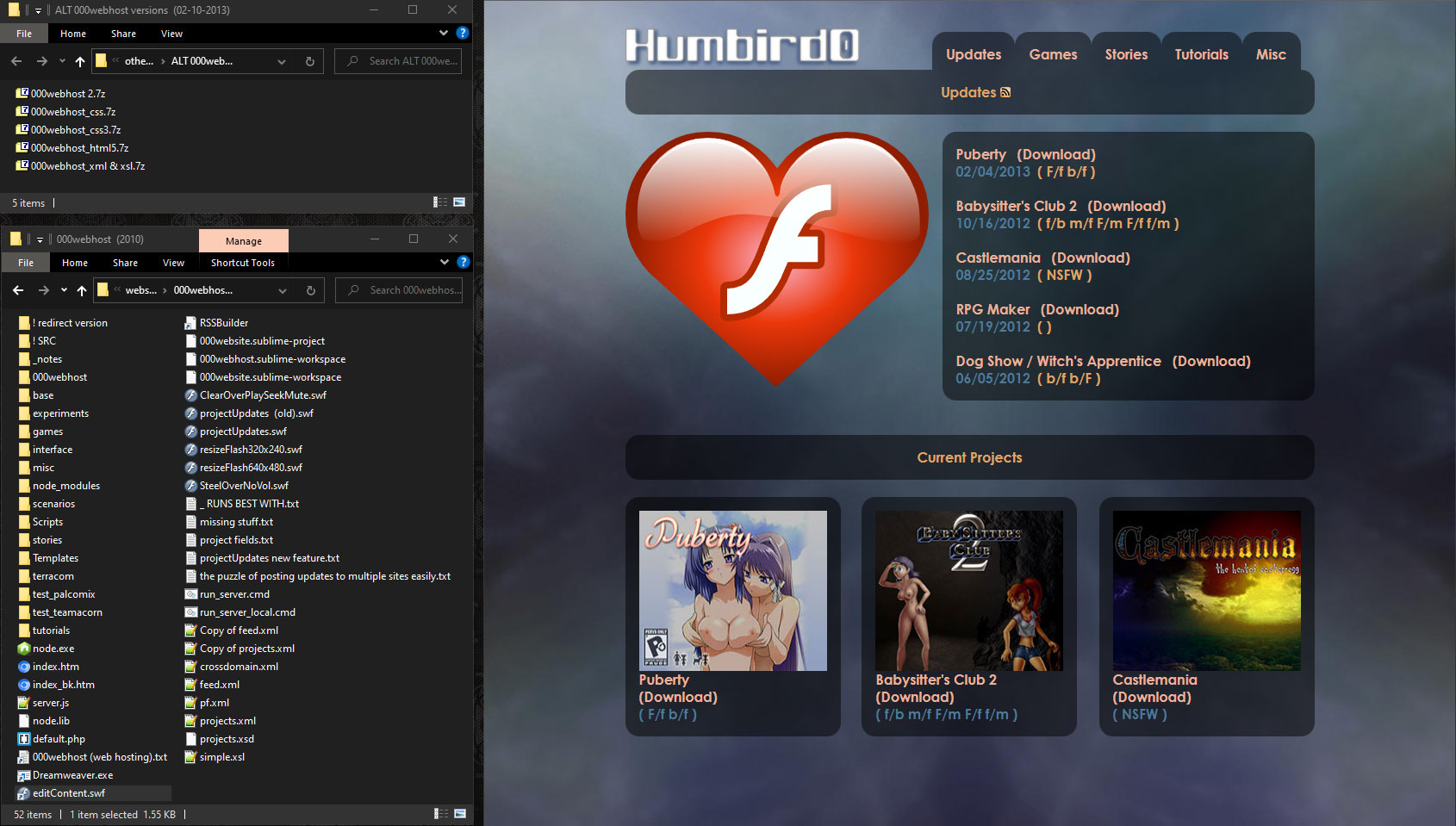
					I actually dragged my feet a little with CSS. I didn&apos;t start learning it until about 2011. I threw together my [original Project Website](https://web.archive.org/web/20100919152731/http://humbird0.net63.net/base/show.htm) in a single weekend back in 2010 using Adobe Dreamweaver. But the website was so simple that I later re-created it using CSS just as an experiment. I also tried out a bunch of other techniques in the process. These experiments became my crash course in modern HTML and CSS. This is when I learned almost everything I know about websites, by remaking the same little website over and over with different techniques. I already knew how this website was supposed to look and act, so it was just about learning how to accomplish the same thing using different techniques.
				&lt;/p&gt;
				&lt;a href=&quot;https://humbird0.com/content/blog/how_i_learned_to_make_websites/content/website-2010.jpg&quot;&gt;
					&lt;img src=&quot;https://humbird0.com/content/blog/how_i_learned_to_make_websites/content/website-2010.jpg&quot; loading=&quot;lazy&quot; alt=&quot;website 2010&quot; /&gt;
				&lt;/a&gt;
			&lt;/div&gt;
		</summary>
		<content type="xhtml">
			<div class="has_loli has_nude has_nsfw">
				<p>
					I actually dragged my feet a little with CSS. I didn't start learning it until about 2011. I threw together my [original Project Website](https://web.archive.org/web/20100919152731/http://humbird0.net63.net/base/show.htm) in a single weekend back in 2010 using Adobe Dreamweaver. But the website was so simple that I later re-created it using CSS just as an experiment. I also tried out a bunch of other techniques in the process. These experiments became my crash course in modern HTML and CSS. This is when I learned almost everything I know about websites, by remaking the same little website over and over with different techniques. I already knew how this website was supposed to look and act, so it was just about learning how to accomplish the same thing using different techniques.
				</p>
				<a href="https://humbird0.com/content/blog/how_i_learned_to_make_websites/content/website-2010.jpg">
					<img src="https://humbird0.com/content/blog/how_i_learned_to_make_websites/content/website-2010.jpg" loading="lazy" alt="website 2010" />
				</a>
			</div>
		</content>
	</entry>


	<entry>
		<title>How I Learned To Make Websites</title>
		<id>tag:humbird0.com,2024-10-29T22:07:00Z:how-i-learned-to-make-websites</id>
		<updated>2024-10-29T22:07:00Z</updated>

		<link rel="alternate" href="https://humbird0.com/content/blog/how_i_learned_to_make_websites/content.htm" />
		<category term="how-i-learned-to-make-websites" />
		<summary type="html">
			&lt;div&gt;
				&lt;p&gt;
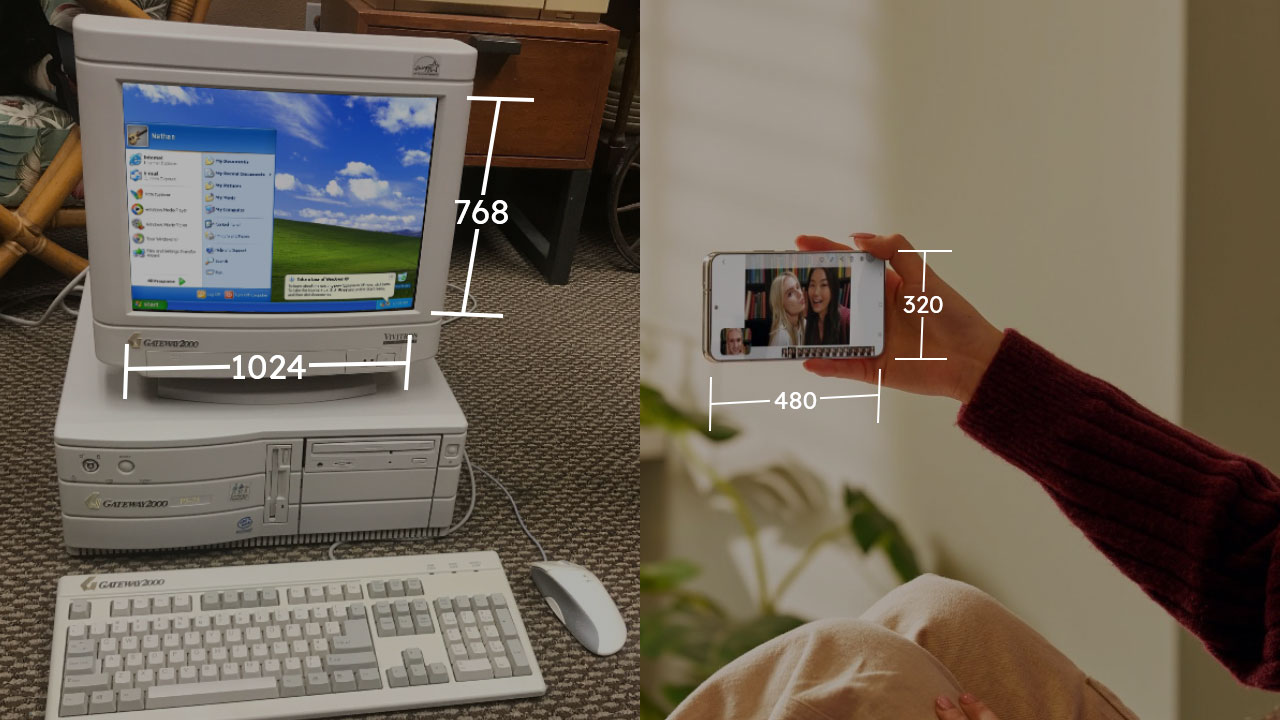
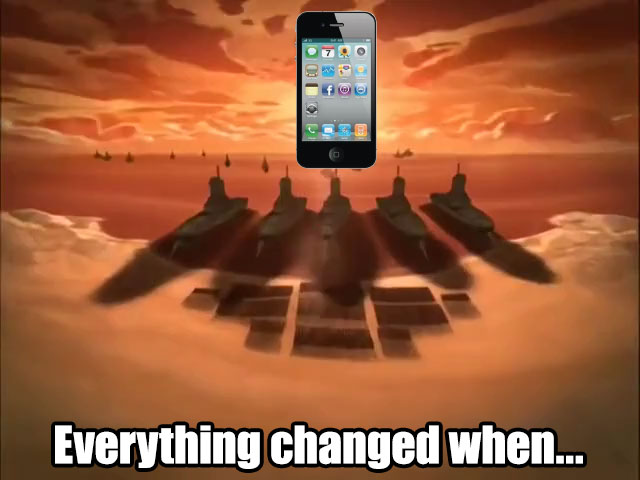
					### Smartphones&lt;br /&gt;&lt;br /&gt;Smartphones also threw a monkey-wrench into things. In the early 2000&apos;s you could safely assume everybody had a computer monitor with at least a 800x600 resolution that was at least a foot wide (and 10 pounds). But smartphones are 2 inch screens with completely random resolutions. Even if you can fit all the pixels, everything will look too tiny to read or tap on with our giant clumsy sausage fingers. So you end up needing to stack things when they don&apos;t fit side-by-side. Tables can&apos;t really do that.
				&lt;/p&gt;
				&lt;a href=&quot;https://humbird0.com/content/blog/how_i_learned_to_make_websites/content/smartphone-tiny-screen.jpg&quot;&gt;
					&lt;img src=&quot;https://humbird0.com/content/blog/how_i_learned_to_make_websites/content/smartphone-tiny-screen.jpg&quot; loading=&quot;lazy&quot; alt=&quot;smartphone tiny screen&quot; /&gt;
				&lt;/a&gt;
			&lt;/div&gt;
		</summary>
		<content type="xhtml">
			<div>
				<p>
					### Smartphones<br /><br />Smartphones also threw a monkey-wrench into things. In the early 2000's you could safely assume everybody had a computer monitor with at least a 800x600 resolution that was at least a foot wide (and 10 pounds). But smartphones are 2 inch screens with completely random resolutions. Even if you can fit all the pixels, everything will look too tiny to read or tap on with our giant clumsy sausage fingers. So you end up needing to stack things when they don't fit side-by-side. Tables can't really do that.
				</p>
				<a href="https://humbird0.com/content/blog/how_i_learned_to_make_websites/content/smartphone-tiny-screen.jpg">
					<img src="https://humbird0.com/content/blog/how_i_learned_to_make_websites/content/smartphone-tiny-screen.jpg" loading="lazy" alt="smartphone tiny screen" />
				</a>
			</div>
		</content>
	</entry>


	<entry>
		<title>How I Learned To Make Websites</title>
		<id>tag:humbird0.com,2024-10-29T22:06:20Z:how-i-learned-to-make-websites</id>
		<updated>2024-10-29T22:06:20Z</updated>

		<link rel="alternate" href="https://humbird0.com/content/blog/how_i_learned_to_make_websites/content.htm" />
		<category term="how-i-learned-to-make-websites" />
		<summary type="html">
			&lt;div&gt;
				&lt;p&gt;
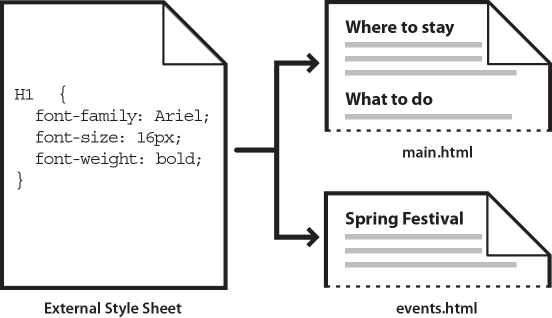
					### It&apos;s hard to change old websites.&lt;br /&gt;&lt;br /&gt;It&apos;s easy to make a website this way. But it&apos;s hard to *change the way it looks* afterwards, because you would have to modify every... single... page! One by one. You could use Dreamweaver templates to rewrite all the pages for you, but then you would have to pay Adobe forever. You can avoid all of this by using a [CSS Style Sheet](https://developer.mozilla.org/en-US/docs/Learn/CSS/First_steps/Getting_started), which is a separate file that describes how all the pages should look. And because it&apos;s a separate file, you can just [change](https://csszengarden.com/207/) [that](https://csszengarden.com/208/) [one](https://csszengarden.com/218/) [file](https://csszengarden.com/204/) to completely transform how the rest of your website looks.
				&lt;/p&gt;
				&lt;a href=&quot;https://humbird0.com/content/blog/how_i_learned_to_make_websites/content/css.png&quot;&gt;
					&lt;img src=&quot;https://humbird0.com/content/blog/how_i_learned_to_make_websites/content/css.png&quot; loading=&quot;lazy&quot; alt=&quot;css&quot; /&gt;
				&lt;/a&gt;
			&lt;/div&gt;
		</summary>
		<content type="xhtml">
			<div>
				<p>
					### It's hard to change old websites.<br /><br />It's easy to make a website this way. But it's hard to *change the way it looks* afterwards, because you would have to modify every... single... page! One by one. You could use Dreamweaver templates to rewrite all the pages for you, but then you would have to pay Adobe forever. You can avoid all of this by using a [CSS Style Sheet](https://developer.mozilla.org/en-US/docs/Learn/CSS/First_steps/Getting_started), which is a separate file that describes how all the pages should look. And because it's a separate file, you can just [change](https://csszengarden.com/207/) [that](https://csszengarden.com/208/) [one](https://csszengarden.com/218/) [file](https://csszengarden.com/204/) to completely transform how the rest of your website looks.
				</p>
				<a href="https://humbird0.com/content/blog/how_i_learned_to_make_websites/content/css.png">
					<img src="https://humbird0.com/content/blog/how_i_learned_to_make_websites/content/css.png" loading="lazy" alt="css" />
				</a>
			</div>
		</content>
	</entry>


	<entry>
		<title>How I Learned To Make Websites</title>
		<id>tag:humbird0.com,2024-10-29T22:05:20Z:how-i-learned-to-make-websites</id>
		<updated>2024-10-29T22:05:20Z</updated>

		<link rel="alternate" href="https://humbird0.com/content/blog/how_i_learned_to_make_websites/content.htm" />
		<category term="how-i-learned-to-make-websites" />
		<summary type="html">
			&lt;div&gt;
				&lt;p&gt;
					## Learning New Things&lt;br /&gt;&lt;br /&gt;So if this is so easy, why is nobody using these anymore?&lt;br /&gt;Because of 2 reasons:&lt;br /&gt;&lt;br /&gt;1. It&apos;s hard to change old websites.&lt;br /&gt;2. Smartphones.
				&lt;/p&gt;
				&lt;a href=&quot;https://humbird0.com/content/blog/how_i_learned_to_make_websites/content/smartphones-changed-everything.jpg&quot;&gt;
					&lt;img src=&quot;https://humbird0.com/content/blog/how_i_learned_to_make_websites/content/smartphones-changed-everything.jpg&quot; loading=&quot;lazy&quot; alt=&quot;smartphones changed everything&quot; /&gt;
				&lt;/a&gt;
			&lt;/div&gt;
		</summary>
		<content type="xhtml">
			<div>
				<p>
					## Learning New Things<br /><br />So if this is so easy, why is nobody using these anymore?<br />Because of 2 reasons:<br /><br />1. It's hard to change old websites.<br />2. Smartphones.
				</p>
				<a href="https://humbird0.com/content/blog/how_i_learned_to_make_websites/content/smartphones-changed-everything.jpg">
					<img src="https://humbird0.com/content/blog/how_i_learned_to_make_websites/content/smartphones-changed-everything.jpg" loading="lazy" alt="smartphones changed everything" />
				</a>
			</div>
		</content>
	</entry>


	<entry>
		<title>How I Learned To Make Websites</title>
		<id>tag:humbird0.com,2024-10-29T22:03:23Z:how-i-learned-to-make-websites</id>
		<updated>2024-10-29T22:03:23Z</updated>

		<link rel="alternate" href="https://humbird0.com/content/blog/how_i_learned_to_make_websites/content.htm" />
		<category term="how-i-learned-to-make-websites" />
		<summary type="html">
			&lt;div&gt;
				&lt;p&gt;
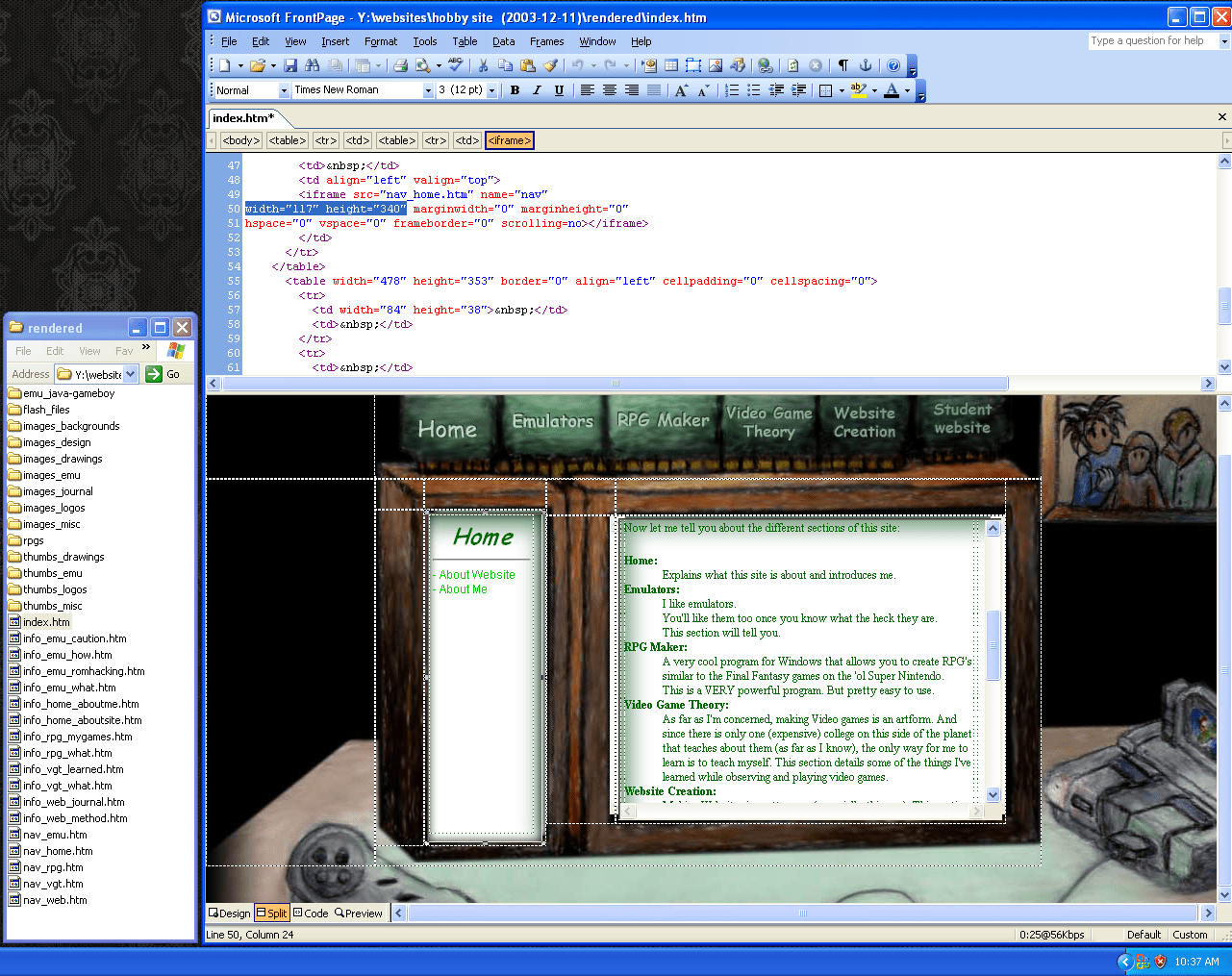
					That was how I built this website back in 2004. It doesn&apos;t even use CSS. Hell it barely even uses pictures. It&apos;s mostly just one giant background picture with areas you can click. Behind the scenes it&apos;s a table and a couple of invisible iFrames. When I click the buttons, the pages get loaded inside those areas.
				&lt;/p&gt;
				&lt;video muted=&quot;muted&quot; controls=&quot;controls&quot; loop=&quot;loop&quot; src=&quot;https://humbird0.com/content/blog/how_i_learned_to_make_websites/content/website-layers.mp4&quot; loading=&quot;lazy&quot; /&gt;
			&lt;/div&gt;
		</summary>
		<content type="xhtml">
			<div>
				<p>
					That was how I built this website back in 2004. It doesn't even use CSS. Hell it barely even uses pictures. It's mostly just one giant background picture with areas you can click. Behind the scenes it's a table and a couple of invisible iFrames. When I click the buttons, the pages get loaded inside those areas.
				</p>
				<video muted="muted" controls="controls" loop="loop" src="https://humbird0.com/content/blog/how_i_learned_to_make_websites/content/website-layers.mp4" loading="lazy" />
			</div>
		</content>
	</entry>


	<entry>
		<title>How I Learned To Make Websites</title>
		<id>tag:humbird0.com,2024-10-29T22:02:50Z:how-i-learned-to-make-websites</id>
		<updated>2024-10-29T22:02:50Z</updated>

		<link rel="alternate" href="https://humbird0.com/content/blog/how_i_learned_to_make_websites/content.htm" />
		<category term="how-i-learned-to-make-websites" />
		<summary type="html">
			&lt;div&gt;
				&lt;p&gt;
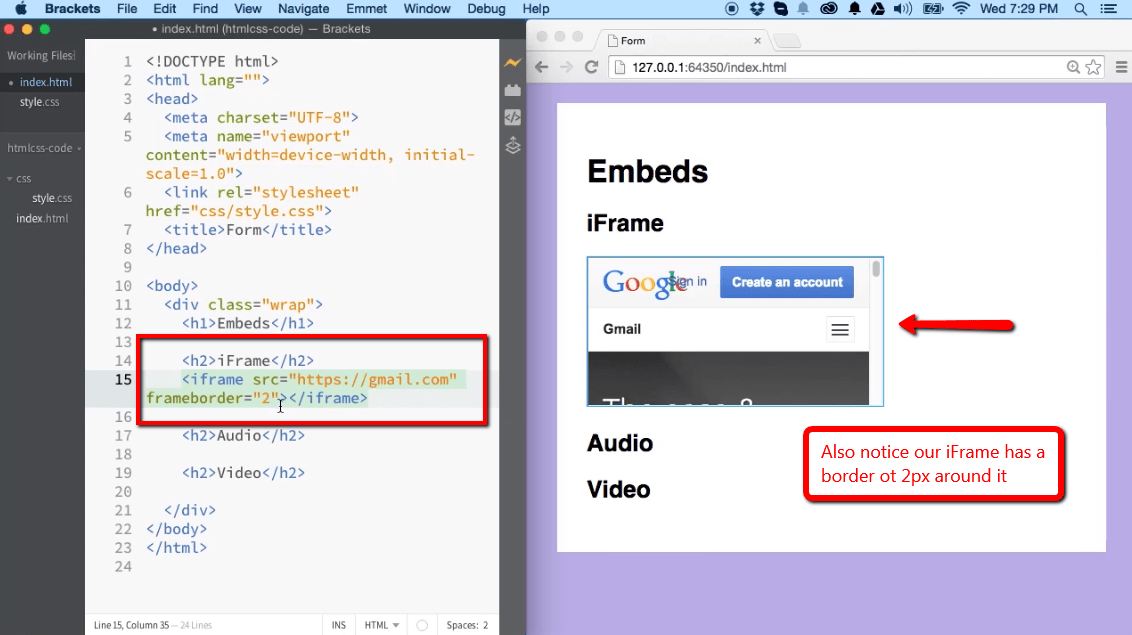
					Tables are very convenient, but also very rigid. Normally you would have to create a new layout for every single page. But you can re-use parts of a page using [˂IFRAME˃](https://developer.mozilla.org/en-US/docs/Web/HTML/Element/iframe) tags which let you keep your navigation buttons on-screen, and only change part of the page when you click on links. Basically you can display a page inside of another page.&lt;br /&gt;https://ilovecoding.org/lessons/embeds-video-audio-and-iframe-elements
 &lt;a href=&quot;https://ilovecoding.org/lessons/embeds-video-audio-and-iframe-elements&quot;&gt;https://ilovecoding.org/lessons/embeds-video-audio-and-iframe-elements&lt;/a&gt;
				&lt;/p&gt;
				&lt;a href=&quot;https://humbird0.com/content/blog/how_i_learned_to_make_websites/content/iframes.png&quot;&gt;
					&lt;img src=&quot;https://humbird0.com/content/blog/how_i_learned_to_make_websites/content/iframes.png&quot; loading=&quot;lazy&quot; alt=&quot;iframes&quot; /&gt;
				&lt;/a&gt;
			&lt;/div&gt;
		</summary>
		<content type="xhtml">
			<div>
				<p>
					Tables are very convenient, but also very rigid. Normally you would have to create a new layout for every single page. But you can re-use parts of a page using [˂IFRAME˃](https://developer.mozilla.org/en-US/docs/Web/HTML/Element/iframe) tags which let you keep your navigation buttons on-screen, and only change part of the page when you click on links. Basically you can display a page inside of another page.<br />https://ilovecoding.org/lessons/embeds-video-audio-and-iframe-elements
 <a href="https://ilovecoding.org/lessons/embeds-video-audio-and-iframe-elements">https://ilovecoding.org/lessons/embeds-video-audio-and-iframe-elements</a>
				</p>
				<a href="https://humbird0.com/content/blog/how_i_learned_to_make_websites/content/iframes.png">
					<img src="https://humbird0.com/content/blog/how_i_learned_to_make_websites/content/iframes.png" loading="lazy" alt="iframes" />
				</a>
			</div>
		</content>
	</entry>


	<entry>
		<title>How I Learned To Make Websites</title>
		<id>tag:humbird0.com,2024-10-29T22:02:03Z:how-i-learned-to-make-websites</id>
		<updated>2024-10-29T22:02:03Z</updated>

		<link rel="alternate" href="https://humbird0.com/content/blog/how_i_learned_to_make_websites/content.htm" />
		<category term="how-i-learned-to-make-websites" />
		<summary type="html">
			&lt;div&gt;
				&lt;p&gt;
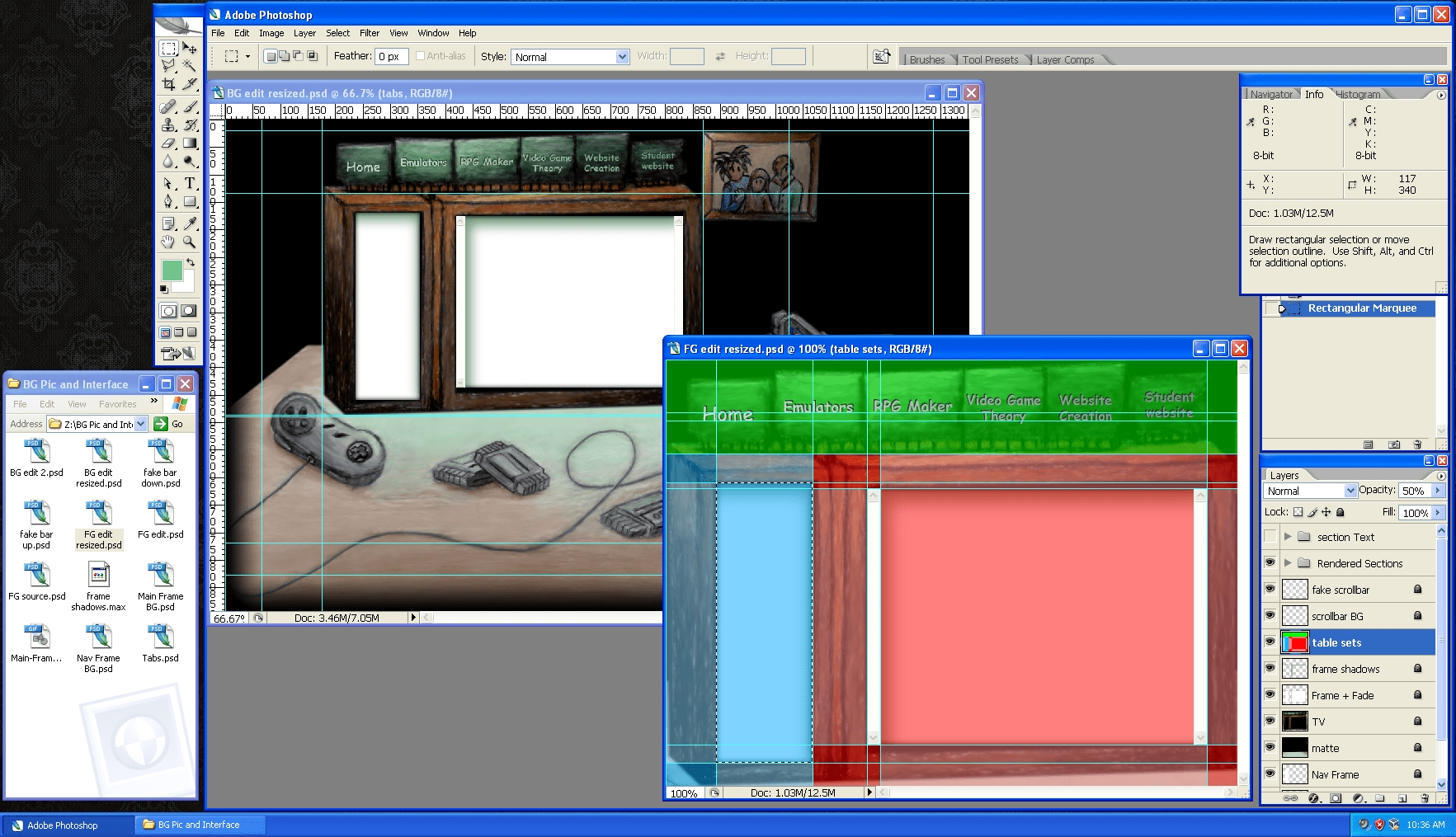
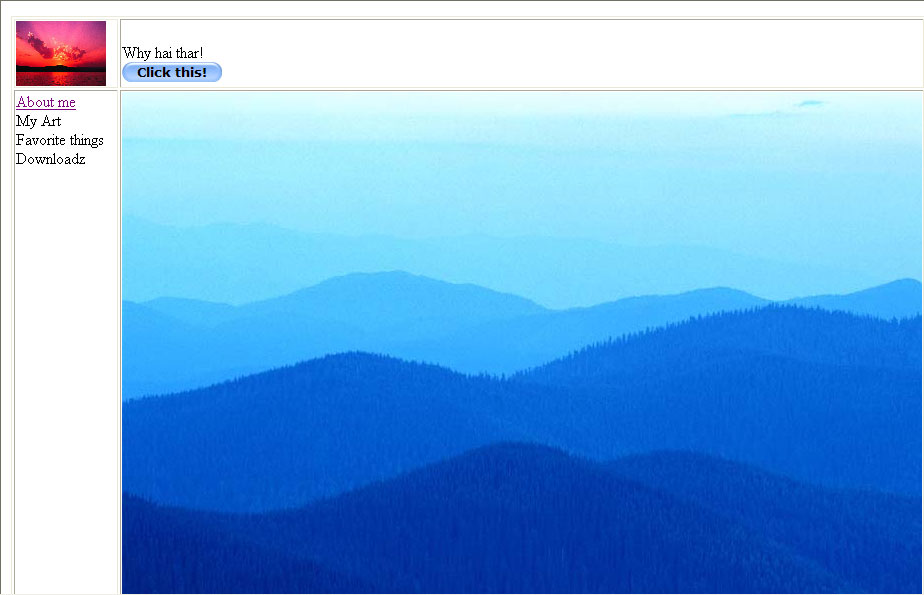
					So here&apos;s how the &quot;good looking&quot; websites were made back then. First you draw a mock-up of your page in Photoshop... yes really. Then export a picture of your design as a JPEG and set that as your *website&apos;s background* so you can trace over it in a graphical website editor! Then you use tables to position things down to the exact pixel. Photoshop even has tools for slicing up pictures for this exact purpose, just so you can put all the pieces inside a table to surround your content.
				&lt;/p&gt;
				&lt;a href=&quot;https://humbird0.com/content/blog/how_i_learned_to_make_websites/content/layout-photoshop.png&quot;&gt;
					&lt;img src=&quot;https://humbird0.com/content/blog/how_i_learned_to_make_websites/content/layout-photoshop.png&quot; loading=&quot;lazy&quot; alt=&quot;layout photoshop&quot; /&gt;
				&lt;/a&gt;
				&lt;a href=&quot;https://humbird0.com/content/blog/how_i_learned_to_make_websites/content/layout-table2.png&quot;&gt;
					&lt;img src=&quot;https://humbird0.com/content/blog/how_i_learned_to_make_websites/content/layout-table2.png&quot; loading=&quot;lazy&quot; alt=&quot;layout table2&quot; /&gt;
				&lt;/a&gt;
			&lt;/div&gt;
		</summary>
		<content type="xhtml">
			<div>
				<p>
					So here's how the "good looking" websites were made back then. First you draw a mock-up of your page in Photoshop... yes really. Then export a picture of your design as a JPEG and set that as your *website's background* so you can trace over it in a graphical website editor! Then you use tables to position things down to the exact pixel. Photoshop even has tools for slicing up pictures for this exact purpose, just so you can put all the pieces inside a table to surround your content.
				</p>
				<a href="https://humbird0.com/content/blog/how_i_learned_to_make_websites/content/layout-photoshop.png">
					<img src="https://humbird0.com/content/blog/how_i_learned_to_make_websites/content/layout-photoshop.png" loading="lazy" alt="layout photoshop" />
				</a>
				<a href="https://humbird0.com/content/blog/how_i_learned_to_make_websites/content/layout-table2.png">
					<img src="https://humbird0.com/content/blog/how_i_learned_to_make_websites/content/layout-table2.png" loading="lazy" alt="layout table2" />
				</a>
			</div>
		</content>
	</entry>


	<entry>
		<title>How I Learned To Make Websites</title>
		<id>tag:humbird0.com,2024-10-29T22:01:01Z:how-i-learned-to-make-websites</id>
		<updated>2024-10-29T22:01:01Z</updated>

		<link rel="alternate" href="https://humbird0.com/content/blog/how_i_learned_to_make_websites/content.htm" />
		<category term="how-i-learned-to-make-websites" />
		<summary type="html">
			&lt;div&gt;
				&lt;p&gt;
					## The Old Approach&lt;br /&gt;&lt;br /&gt;But fine. Big deal if you can make an ugly GeoCities page. Everything is just centered and stacked on top of each other. How do you make it, you know... good?&lt;br /&gt;&lt;br /&gt;Tables!  [˂TABLE˃,  ˂TR˃,  ˂TD˃](https://developer.mozilla.org/en-US/docs/Web/HTML/Element/table)&lt;br /&gt;Back then that was the only way to put things next to each other in any controlled way.&lt;br /&gt;https://wvrocker.tripod.com/tables.html
 &lt;a href=&quot;https://wvrocker.tripod.com/tables.html&quot;&gt;https://wvrocker.tripod.com/tables.html&lt;/a&gt;
				&lt;/p&gt;
				&lt;a href=&quot;https://humbird0.com/content/blog/how_i_learned_to_make_websites/content/layout-table1.jpg&quot;&gt;
					&lt;img src=&quot;https://humbird0.com/content/blog/how_i_learned_to_make_websites/content/layout-table1.jpg&quot; loading=&quot;lazy&quot; alt=&quot;layout table1&quot; /&gt;
				&lt;/a&gt;
			&lt;/div&gt;
		</summary>
		<content type="xhtml">
			<div>
				<p>
					## The Old Approach<br /><br />But fine. Big deal if you can make an ugly GeoCities page. Everything is just centered and stacked on top of each other. How do you make it, you know... good?<br /><br />Tables!  [˂TABLE˃,  ˂TR˃,  ˂TD˃](https://developer.mozilla.org/en-US/docs/Web/HTML/Element/table)<br />Back then that was the only way to put things next to each other in any controlled way.<br />https://wvrocker.tripod.com/tables.html
 <a href="https://wvrocker.tripod.com/tables.html">https://wvrocker.tripod.com/tables.html</a>
				</p>
				<a href="https://humbird0.com/content/blog/how_i_learned_to_make_websites/content/layout-table1.jpg">
					<img src="https://humbird0.com/content/blog/how_i_learned_to_make_websites/content/layout-table1.jpg" loading="lazy" alt="layout table1" />
				</a>
			</div>
		</content>
	</entry>


	<entry>
		<title>How I Learned To Make Websites</title>
		<id>tag:humbird0.com,2024-10-29T22:00:14Z:how-i-learned-to-make-websites</id>
		<updated>2024-10-29T22:00:14Z</updated>

		<link rel="alternate" href="https://humbird0.com/content/blog/how_i_learned_to_make_websites/content.htm" />
		<category term="how-i-learned-to-make-websites" />
		<summary type="html">
			&lt;div&gt;
				&lt;p&gt;
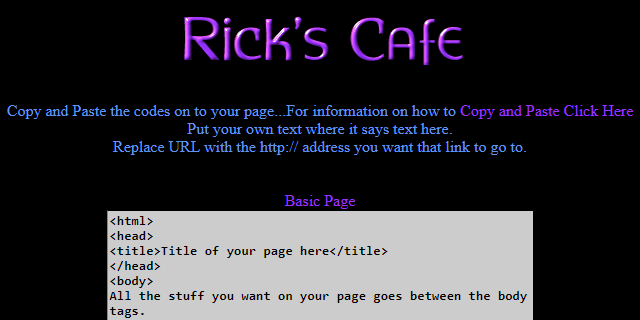
					... or you can just look up the main HTML tags. You only really need about 5 of them most of the time. [˂IMG˃](https://developer.mozilla.org/en-US/docs/Web/HTML/Element/img),  [˂A HREF˃](https://developer.mozilla.org/en-US/docs/Web/HTML/Element/a),  [˂DIV˃](https://developer.mozilla.org/en-US/docs/Web/HTML/Element/div),  [˂SPAN˃](https://developer.mozilla.org/en-US/docs/Web/HTML/Element/span),  [˂BR˃](https://developer.mozilla.org/en-US/docs/Web/HTML/Element/br)&lt;br /&gt;&lt;br /&gt;https://wvrocker.tripod.com/codes.html&lt;br /&gt;https://wvrocker.tripod.com/tables.html
 &lt;a href=&quot;https://wvrocker.tripod.com/codes.html&quot;&gt;https://wvrocker.tripod.com/codes.html&lt;/a&gt;
 &lt;a href=&quot;https://wvrocker.tripod.com/tables.html&quot;&gt;https://wvrocker.tripod.com/tables.html&lt;/a&gt;
				&lt;/p&gt;
				&lt;a href=&quot;https://humbird0.com/content/blog/how_i_learned_to_make_websites/content/ricks-cafe.png&quot;&gt;
					&lt;img src=&quot;https://humbird0.com/content/blog/how_i_learned_to_make_websites/content/ricks-cafe.png&quot; loading=&quot;lazy&quot; alt=&quot;ricks cafe&quot; /&gt;
				&lt;/a&gt;
			&lt;/div&gt;
		</summary>
		<content type="xhtml">
			<div>
				<p>
					... or you can just look up the main HTML tags. You only really need about 5 of them most of the time. [˂IMG˃](https://developer.mozilla.org/en-US/docs/Web/HTML/Element/img),  [˂A HREF˃](https://developer.mozilla.org/en-US/docs/Web/HTML/Element/a),  [˂DIV˃](https://developer.mozilla.org/en-US/docs/Web/HTML/Element/div),  [˂SPAN˃](https://developer.mozilla.org/en-US/docs/Web/HTML/Element/span),  [˂BR˃](https://developer.mozilla.org/en-US/docs/Web/HTML/Element/br)<br /><br />https://wvrocker.tripod.com/codes.html<br />https://wvrocker.tripod.com/tables.html
 <a href="https://wvrocker.tripod.com/codes.html">https://wvrocker.tripod.com/codes.html</a>
 <a href="https://wvrocker.tripod.com/tables.html">https://wvrocker.tripod.com/tables.html</a>
				</p>
				<a href="https://humbird0.com/content/blog/how_i_learned_to_make_websites/content/ricks-cafe.png">
					<img src="https://humbird0.com/content/blog/how_i_learned_to_make_websites/content/ricks-cafe.png" loading="lazy" alt="ricks cafe" />
				</a>
			</div>
		</content>
	</entry>


	<entry>
		<title>How I Learned To Make Websites</title>
		<id>tag:humbird0.com,2024-10-29T21:58:54Z:how-i-learned-to-make-websites</id>
		<updated>2024-10-29T21:58:54Z</updated>

		<link rel="alternate" href="https://humbird0.com/content/blog/how_i_learned_to_make_websites/content.htm" />
		<category term="how-i-learned-to-make-websites" />
		<summary type="html">
			&lt;div&gt;
				&lt;p&gt;
					If a [GeoCities](https://en.wikipedia.org/wiki/GeoCities) website did something cool, you could just right-click their page and &quot;View Source&quot; to see how they did it. Then just copy-and-paste it into your own page. That&apos;s not stealing. It&apos;s learning. Nobody owns HTML code. The web was designed like this on purpose.
				&lt;/p&gt;
				&lt;a href=&quot;https://humbird0.com/content/blog/how_i_learned_to_make_websites/content/view-source.png&quot;&gt;
					&lt;img src=&quot;https://humbird0.com/content/blog/how_i_learned_to_make_websites/content/view-source.png&quot; loading=&quot;lazy&quot; alt=&quot;view source&quot; /&gt;
				&lt;/a&gt;
				&lt;a href=&quot;https://humbird0.com/content/blog/how_i_learned_to_make_websites/content/capitalism-music-stops.jpg&quot;&gt;
					&lt;img src=&quot;https://humbird0.com/content/blog/how_i_learned_to_make_websites/content/capitalism-music-stops.jpg&quot; loading=&quot;lazy&quot; alt=&quot;capitalism music stops&quot; /&gt;
				&lt;/a&gt;
			&lt;/div&gt;
		</summary>
		<content type="xhtml">
			<div>
				<p>
					If a [GeoCities](https://en.wikipedia.org/wiki/GeoCities) website did something cool, you could just right-click their page and "View Source" to see how they did it. Then just copy-and-paste it into your own page. That's not stealing. It's learning. Nobody owns HTML code. The web was designed like this on purpose.
				</p>
				<a href="https://humbird0.com/content/blog/how_i_learned_to_make_websites/content/view-source.png">
					<img src="https://humbird0.com/content/blog/how_i_learned_to_make_websites/content/view-source.png" loading="lazy" alt="view source" />
				</a>
				<a href="https://humbird0.com/content/blog/how_i_learned_to_make_websites/content/capitalism-music-stops.jpg">
					<img src="https://humbird0.com/content/blog/how_i_learned_to_make_websites/content/capitalism-music-stops.jpg" loading="lazy" alt="capitalism music stops" />
				</a>
			</div>
		</content>
	</entry>


	<entry>
		<title>How I Learned To Make Websites</title>
		<id>tag:humbird0.com,2024-10-29T21:58:08Z:how-i-learned-to-make-websites</id>
		<updated>2024-10-29T21:58:08Z</updated>

		<link rel="alternate" href="https://humbird0.com/content/blog/how_i_learned_to_make_websites/content.htm" />
		<category term="how-i-learned-to-make-websites" />
		<summary type="html">
			&lt;div&gt;
				&lt;p&gt;
					And Microsoft made a great one called [Frontpage](https://archive.org/details/microsoft-office-frontpage-2003-english). All of these are visual editors. All drag-and-drop. All easy to use. And if you had any curiosity at all, you would naturally peek behind the curtain at the text that it&apos;s writing.
				&lt;/p&gt;
				&lt;video muted=&quot;muted&quot; controls=&quot;controls&quot; loop=&quot;loop&quot; src=&quot;https://humbird0.com/content/blog/how_i_learned_to_make_websites/content/microsoft-frontpage.mp4&quot; loading=&quot;lazy&quot; /&gt;
			&lt;/div&gt;
		</summary>
		<content type="xhtml">
			<div>
				<p>
					And Microsoft made a great one called [Frontpage](https://archive.org/details/microsoft-office-frontpage-2003-english). All of these are visual editors. All drag-and-drop. All easy to use. And if you had any curiosity at all, you would naturally peek behind the curtain at the text that it's writing.
				</p>
				<video muted="muted" controls="controls" loop="loop" src="https://humbird0.com/content/blog/how_i_learned_to_make_websites/content/microsoft-frontpage.mp4" loading="lazy" />
			</div>
		</content>
	</entry>


	<entry>
		<title>How I Learned To Make Websites</title>
		<id>tag:humbird0.com,2024-10-29T21:57:28Z:how-i-learned-to-make-websites</id>
		<updated>2024-10-29T21:57:28Z</updated>

		<link rel="alternate" href="https://humbird0.com/content/blog/how_i_learned_to_make_websites/content.htm" />
		<category term="how-i-learned-to-make-websites" />
		<summary type="html">
			&lt;div&gt;
				&lt;p&gt;
					I built my first website in [Adobe Pagemill](https://archive.org/details/Adobe_PageMill_3_-_Windows95-Mac_Eng) in the year 2000. Look how easy this is!
				&lt;/p&gt;
				&lt;video muted=&quot;muted&quot; controls=&quot;controls&quot; loop=&quot;loop&quot; src=&quot;https://humbird0.com/content/blog/how_i_learned_to_make_websites/content/adobe-pagemill.mp4&quot; loading=&quot;lazy&quot; /&gt;
			&lt;/div&gt;
		</summary>
		<content type="xhtml">
			<div>
				<p>
					I built my first website in [Adobe Pagemill](https://archive.org/details/Adobe_PageMill_3_-_Windows95-Mac_Eng) in the year 2000. Look how easy this is!
				</p>
				<video muted="muted" controls="controls" loop="loop" src="https://humbird0.com/content/blog/how_i_learned_to_make_websites/content/adobe-pagemill.mp4" loading="lazy" />
			</div>
		</content>
	</entry>


	<entry>
		<title>How I Learned To Make Websites</title>
		<id>tag:humbird0.com,2024-10-29T21:55:55Z:how-i-learned-to-make-websites</id>
		<updated>2024-10-29T21:55:55Z</updated>

		<link rel="alternate" href="https://humbird0.com/content/blog/how_i_learned_to_make_websites/content.htm" />
		<category term="how-i-learned-to-make-websites" />
		<summary type="html">
			&lt;div&gt;
				&lt;p&gt;
					I take it for granted that easy tools like these exist. But they&apos;re old, so why would anybody want to use ancient software from 25 years ago? ... because they **STILL WORK**.&lt;br /&gt;&lt;br /&gt;New features were gradually added to HTML, but the original features did not go away. You can still build a website &quot;the old way&quot; and with very few exceptions it will still work perfectly. Granted these methods are now &quot;the wrong way&quot; because... tables or something. But more importantly these methods are easy. It&apos;s a good way to start.
				&lt;/p&gt;
				&lt;video muted=&quot;muted&quot; controls=&quot;controls&quot; loop=&quot;loop&quot; src=&quot;https://humbird0.com/content/blog/how_i_learned_to_make_websites/content/netscape-composer.mp4&quot; loading=&quot;lazy&quot; /&gt;
			&lt;/div&gt;
		</summary>
		<content type="xhtml">
			<div>
				<p>
					I take it for granted that easy tools like these exist. But they're old, so why would anybody want to use ancient software from 25 years ago? ... because they **STILL WORK**.<br /><br />New features were gradually added to HTML, but the original features did not go away. You can still build a website "the old way" and with very few exceptions it will still work perfectly. Granted these methods are now "the wrong way" because... tables or something. But more importantly these methods are easy. It's a good way to start.
				</p>
				<video muted="muted" controls="controls" loop="loop" src="https://humbird0.com/content/blog/how_i_learned_to_make_websites/content/netscape-composer.mp4" loading="lazy" />
			</div>
		</content>
	</entry>


	<entry>
		<title>How I Learned To Make Websites</title>
		<id>tag:humbird0.com,2024-10-29T21:54:17Z:how-i-learned-to-make-websites</id>
		<updated>2024-10-29T21:54:17Z</updated>

		<link rel="alternate" href="https://humbird0.com/content/blog/how_i_learned_to_make_websites/content.htm" />
		<category term="how-i-learned-to-make-websites" />
		<summary type="html">
			&lt;div&gt;
				&lt;p&gt;
					##  Amazing Tools From a Bygone Era&lt;br /&gt;&lt;br /&gt;I believe this because I grew up in a time when web browsers like [Netscape Communicator](https://en.wikipedia.org/wiki/Netscape_Communicator) came with GRAPHICAL website editors that worked without you having to know any code. They worked like word processors. They were called [WYSIWYG editors](https://en.wikipedia.org/wiki/WYSIWYG)  (What You See Is What You Get)
				&lt;/p&gt;
				&lt;video muted=&quot;muted&quot; controls=&quot;controls&quot; loop=&quot;loop&quot; src=&quot;https://humbird0.com/content/blog/how_i_learned_to_make_websites/content/netscape-composer.mp4&quot; loading=&quot;lazy&quot; /&gt;
			&lt;/div&gt;
		</summary>
		<content type="xhtml">
			<div>
				<p>
					##  Amazing Tools From a Bygone Era<br /><br />I believe this because I grew up in a time when web browsers like [Netscape Communicator](https://en.wikipedia.org/wiki/Netscape_Communicator) came with GRAPHICAL website editors that worked without you having to know any code. They worked like word processors. They were called [WYSIWYG editors](https://en.wikipedia.org/wiki/WYSIWYG)  (What You See Is What You Get)
				</p>
				<video muted="muted" controls="controls" loop="loop" src="https://humbird0.com/content/blog/how_i_learned_to_make_websites/content/netscape-composer.mp4" loading="lazy" />
			</div>
		</content>
	</entry>


	<entry>
		<title>How I Learned To Make Websites</title>
		<id>tag:humbird0.com,2024-10-29T21:51:15Z:how-i-learned-to-make-websites</id>
		<updated>2024-10-29T21:51:15Z</updated>

		<link rel="alternate" href="https://humbird0.com/content/blog/how_i_learned_to_make_websites/content.htm" />
		<category term="how-i-learned-to-make-websites" />
		<summary type="html">
			&lt;div class=&quot;has_by_humbird0 has_finished has_webdev has_staticsitegenerator has_retrocomputing has_programming has_markdown has_javascript has_hugo has_html has_ftp has_css has_computerhistory has_tutorial&quot;&gt;
				&lt;p&gt;
					# How I Learned To Make Websites&lt;br /&gt;&lt;br /&gt;I often tell people it&apos;s easy to make a website. Why do I believe that?&lt;br /&gt;&lt;br /&gt;Thread Continues
				&lt;/p&gt;
				&lt;a href=&quot;https://humbird0.com/content/blog/how_i_learned_to_make_websites/content/figure-out-where-to-start.png&quot;&gt;
					&lt;img src=&quot;https://humbird0.com/content/blog/how_i_learned_to_make_websites/content/figure-out-where-to-start.png&quot; loading=&quot;lazy&quot; alt=&quot;Let me just figure out where to start&quot; /&gt;
				&lt;/a&gt;
			&lt;/div&gt;
		</summary>
		<content type="xhtml">
			<div class="has_by_humbird0 has_finished has_webdev has_staticsitegenerator has_retrocomputing has_programming has_markdown has_javascript has_hugo has_html has_ftp has_css has_computerhistory has_tutorial">
				<p>
					# How I Learned To Make Websites<br /><br />I often tell people it's easy to make a website. Why do I believe that?<br /><br />Thread Continues
				</p>
				<a href="https://humbird0.com/content/blog/how_i_learned_to_make_websites/content/figure-out-where-to-start.png">
					<img src="https://humbird0.com/content/blog/how_i_learned_to_make_websites/content/figure-out-where-to-start.png" loading="lazy" alt="Let me just figure out where to start" />
				</a>
			</div>
		</content>
	</entry>

</feed>