#
I got a new toy! This lightbox should let me play around with some traditional animation on paper.

#
 With this new super-power, I will once again chase my dream of achieving Shantae-quality sprite animations.
#
A sprite animation? … from paper sketches?? It’s more likely than you think. (YouTube) And in this case WayForward already did the hard work of figuring out how to simplify the details, so I just need to reverse-engineer their sprite into a sketch of equivalent simplicity and proportions.
#


#
But I don’t want to just remake the game’s dances. I wanna make something new and super sexy. This “2 Phut Hon” dance might be fun, but aside from some epic boobage, the pose itself just kinda bounces in place. I think Shantae should have some flow in her movements…
#
… so let’s add some Yoga to it.

#
I’ll make the arch of her back follow along this curve so that she snakes upward.
#


#
Now that I have my keyframes, let’s scale these down to double the size of the gameboy sprite, and digitally add some in-between frames. Maybe my Linux software store has something I can use?

#
This old version of Pencil2D is slightly janky, but I think I can make this work.

#
 Ooh! This is animation is gonna come out nice!
#Gameboy Color Sprite
#
Alright, let’s shrink it in half and trace over it in Aseprite.

#
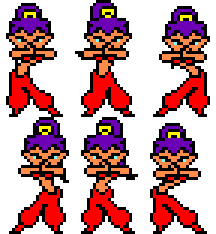
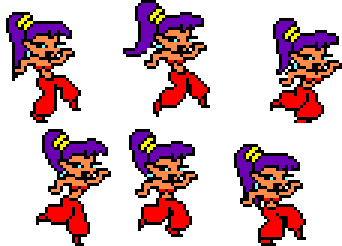
 So here’s my new Shantae dance.
#
… compared to the dances in the original game.
#

#
My “reverse engineering” technique was kind of improvised on the spot. But it worked surprisingly well! I’m glad it successfully preserved the original proportions and level of detail.
#
In hindsight, using actual tracing paper probably would have made animating easier, but I wanted to do this as cheaply as possible. It was just an experiment.
#Gameboy Advance Sprite
#
Now let’s see if I can turn this into a Gameboy Advance sprite.
#
Before jumping into animation, I started with a bunch of tests to figure out what I wanted and how it could be done.
#
 test 1
 stronger edge shading
 leg gradient shading
 no contrast boost
 lighter skin gradient map
 darken outline to 20 percent grey
 lighter reds
 no leg shading gradient
 slightly darker reds
 shade edges using a blurred outline
 outline at 60 percent
 no edge shading
#
 The basic idea ended up being to double the sprite pixels (nearest neighbor), then do traditional photoshop shading, add colors using gradient maps, then shrink the result back down (bilinear, and then finally apply the original gameboy advance palette to it. If you want all the details, you can look at the PSD file.
#
 double size
 sprite size
 sprite size with a limited palette
#
Unlike my
 previous anti-aliasing experiments
which blur the entire picture with bilinear scaling, this approach only really blurs the shading, because the double-size pixels of the outline end up scaling back down as-is. I consider this a successful result.
previous anti-aliasing experiments
which blur the entire picture with bilinear scaling, this approach only really blurs the shading, because the double-size pixels of the outline end up scaling back down as-is. I consider this a successful result.
#
How does this compare to the actual Shantae games?
#
 my sprite
 original sprite
#
I think the difference comes down to art skill more than technical methods at this point. For one thing I forgot to draw her hair bangs. But the original sprite also has me beat with additional details, and those details do look sharper. But I’m pretty satisfied with what I managed to achieve.
#
My overall conclusions are that you should draw sprite outlines by hand (but you can trace over your sketches). You can optionally add anti-aliasing to the outline by hand as well. Then you can add shading using Photoshop at double size (nearest neighbor) and then afterwards shrink that back down using bilinear scaling. At the end you could adjust a few pixels here and there by hand if needed, but in this case I didn’t even need to!
#
 … and since someone requested it, I also made a naked version. All I did was switch the red parts to skin tones, and then adjust the results by hand to remove the “parachute pants”